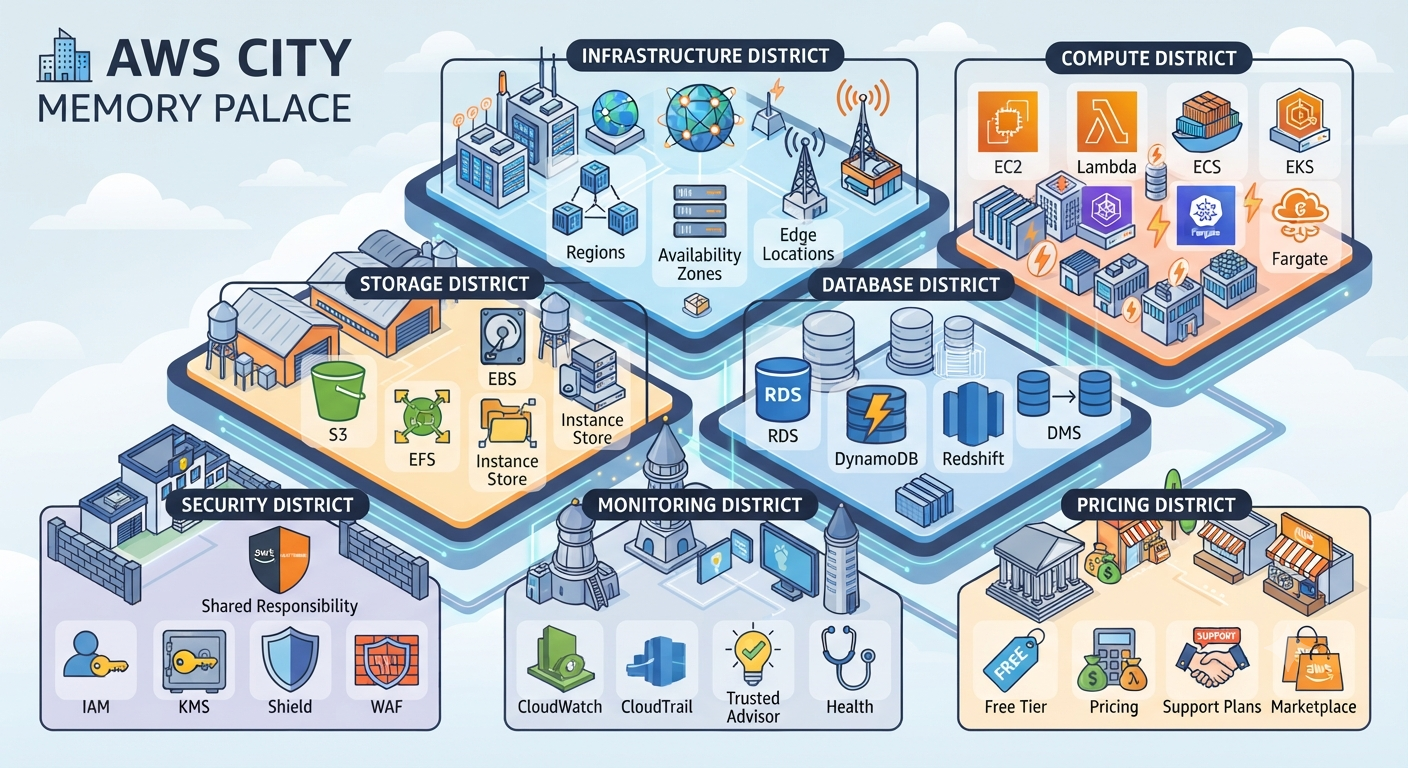
I created this AWS Memory Palace in order to remember what AWS services are and what those are for.
This memory palace method itself is taught in Tony Buzan's book: Master your Memory.
With this method it will easily for us to remember things by using more of our senses.
The content of this article some are excerpt from w3school Learning AWS content.
So here are the AWS Services are:
Infrastructure District
- Regions : a geographic area containing AWS data centers.
- Availability Zones : is one or more data centers within a Region, each with independent power, networking, and connectivity
- Edge Locations: are strategically placed sites around the world that cache content to deliver data with lower latency
Database District
- RDS: Relational Database Service, a managed service for relational databases that use SQL. RDS handles backups, patching, and hardware provisioning automatically.
- DynamoDB: a fully managed NoSQL database for key-value and document data. NoSQL databases use flexible schemas where each item has a key and attributes, but unlike relational databases, different items can have different attributes
- Redshift : a fully managed data warehouse service for big data analytics. It can analyze petabytes of data from multiple sources using SQL queries, ideal when data becomes too large for traditional databases.
- DMS : DB Migration Service, moves data from a source database to a target database.
Storage District
- **S3 **(Simple Storage Service) : is a fully managed object storage service with **99.999999999% durability**. It can store any type of file up to 5 TB per object, with virtually unlimited total capacity.
- EFS Elastic File System : is a fully managed, scalable file storage service using the NFS protocol. It automatically scales to petabytes and allows multiple EC2 instances to access the same file system simultaneously.
- Instance Store: s block-level storage physically attached to the EC2 instance host computer. Data persists during reboots but is lost when the instance is stopped or terminated.
- **EBS (**Elastic Block Store) : provides persistent block-level storage volumes for EC2 instances. Unlike instance stores, EBS data persists even when the instance is stopped or terminated.
Monitoring District
- CloudWatch: monitors your AWS resources and applications in real time, providing visibility into resource utilization, application performance, and operational health.
- CloudTrail: tracks user activity and API usage across AWS, on-premises, and other cloud providers. It provides a detailed history of API calls so you can track changes, identify who made them, and when
- Trusted Advisor: continuously evaluates your AWS environment using best practice checks across five categories: cost optimization, performance, security, fault tolerance, and service limits.
- Health: is the go-to data source for events and changes affecting the health of your AWS Cloud resources. It notifies you about service events, planned changes, and account notifications to help you manage and take actions.
Compute District
- EC2: Elastic Compute Cloud, provides virtual servers in the AWS Cloud. Get computing power on-demand without buying physical hardware, and scale capacity as needed.
- Lambda: is a serverless compute service that runs code in response to events. No servers to manage, automatic scaling, and you pay only for compute time used (down to the millisecond).
- ECS: Elastic Container Service, is a container orchestration service for deploying, scaling, and managing containerized applications on AWS
- EKS: Elastic Kubernetes Service, is a fully managed service for running Kubernetes on AWS. It simplifies deploying, managing, and scaling containerized applications
- Fargate: Fargate is a serverless compute engine for containers. No servers to provision or manage. Fargate handles the infrastructure so you can focus on developing your applications
Security District
- IAM Identity Access Management :
- KMS
- Shield
- WAF